Nine pairs.
One chart.
One system.
Nexus Nine is a fully automated multi-currency Expert Advisor for MetaTrader 5. It monitors and trades nine major cross pairs from a single chart attachment — with fixed risk, no martingale, and a built-in monitoring panel.
Free forever · No registration · No email required
Mean reversion across nine pairs, decided session by session.
Nexus Nine identifies short-term price dislocations using a proprietary multi-timeframe oscillator combined with volatility-adaptive filtering. When price extends beyond statistically significant levels during active trading sessions, the EA enters counter-trend positions with fixed stop loss and take profit — capturing the natural tendency of price to revert to equilibrium.
Every trade has a hard SL and TP. No martingale. No grid. No hedging. No averaging down. One position per signal, per pair.
This is not curve-fitted indicator stacking. Not a black-box neural network. A clean, systematic edge built on observable market behavior.
Nine pairs. One chart attachment.
The EA handles symbol resolution and broker suffix detection automatically. Attach to any M1 chart — the EA manages the rest internally.
A real-time dashboard for all nine pairs.
A built-in panel displays the full state of every pair at a glance — bid price, spread, oscillator reading, signal state, active positions, and floating P&L. Press [P] at any time to show or hide it.
Two editions. Same engine.
| Feature |  Free Free |
 Pro Pro |
|---|---|---|
| 9-pair multi-currency engine | ✓ | ✓ |
| Built-in monitoring panel | ✓ | ✓ |
| Automatic suffix detection | ✓ | ✓ |
| Spread filter & margin pre-check | ✓ | ✓ |
| Fixed SL / TP on every trade | ✓ | ✓ |
| Lot size | Fixed at 0.05 | Adjustable |
| Strategy parameters (SL, TP, max spread, slippage) | Locked | Customizable |
| Magic number base | — | ✓ |
| Panel customization (position, font, colors) | ✓ | ✓ |
| 3-month rental option | — | ✓ |
| Free forever | ✓ | — |
Start with Free. Upgrade when you need lot control and parameter tuning. Current pricing on the MQL5 product page.
Free for our IB partners. For life.
A separate, account-bound build given freely to traders who open or transfer their Exness MT5 account through our IB partner code. No purchase. No subscription. No license fee — ever. The economics are simple: Exness pays us a small rebate on the spreads you generate, and we pass the EA through to you in exchange.

- Same Pro engine · adjustable lot, SL, TP, all parameters
- XAUUSD always active · gold module unlocked from day one
- Account-bound · verified daily via our license API
- Lifetime access · renews automatically while your account stays under our IB
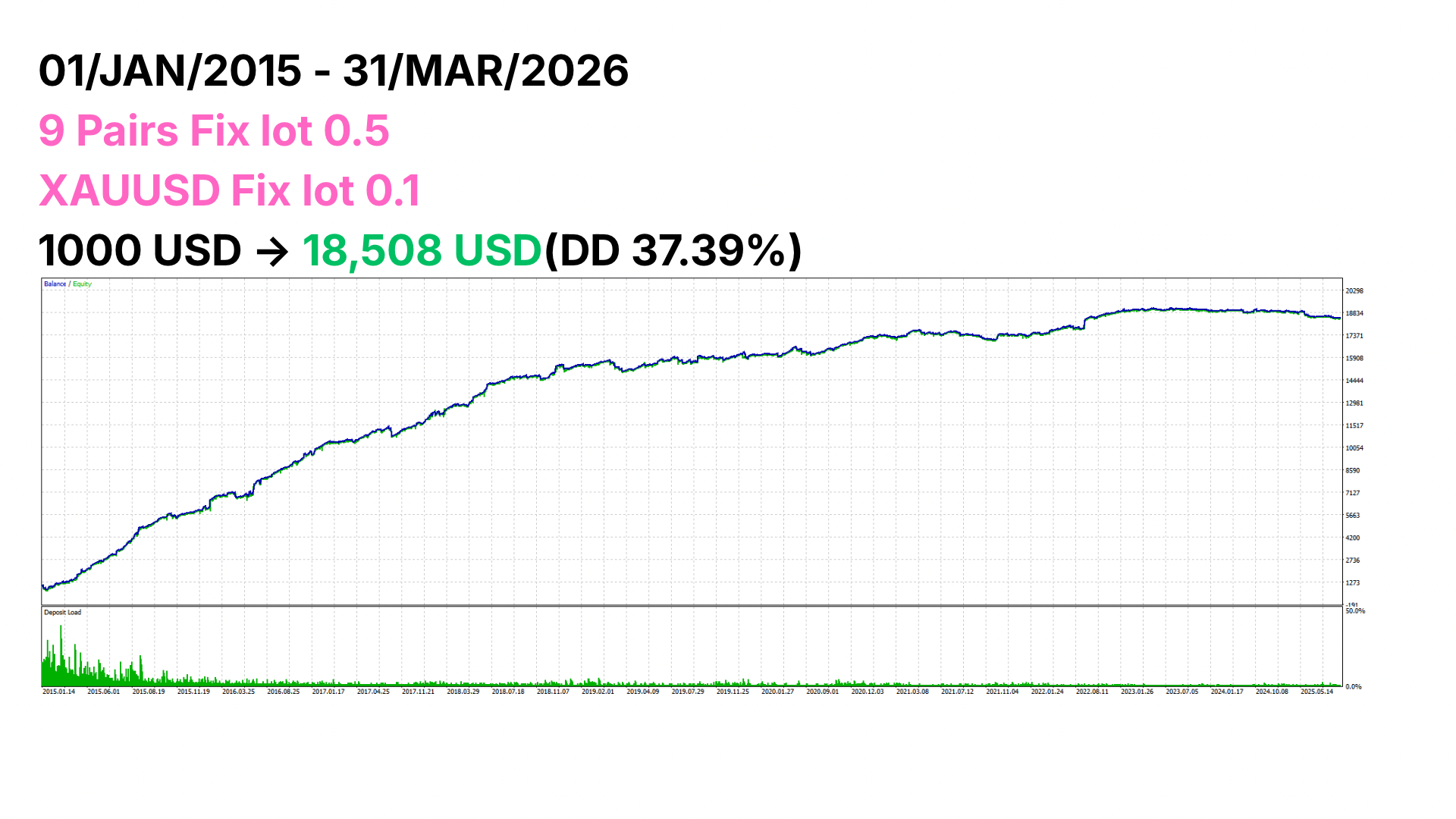
01 Jan 2015 → 31 Mar 2026 (11+ years). Starting balance $1,000 → $18,508 ending equity. 37.39% maximum drawdown. Parameters as shown in chart. Past backtest performance does not guarantee future results. Always verify on your own broker's tick data before going live.
How to get access
Two paths depending on your current Exness status.

Open a new Exness MT5 account through our IB partner link, deposit, and start trading. Then email your MT5 account number — your license activates within 24 hours.
Open Exness accountOpen Exness Live Chat from your Personal Area and request a partner change to code f4rurzr27h. Reflection time is typically up to one week. Once Exness confirms, email us your MT5 account number.
After verification, send us a message at [email protected] with your MT5 account number, your country of residence (must not be Japan), and which path above you took. The EA file is delivered by reply email after we verify the IB linkage on our Exness Partner Dashboard.
Geographic restriction: the Community Edition is not available to residents of Japan due to local financial regulations. The Free and Pro editions on the MQL5 Marketplace remain available in Japan and worldwide.
Download — for activated accounts only
Once your license is activated (you'll receive a confirmation email), download the EA file below. The EA verifies your MT5 account against our license server on startup — downloading without an active license will not allow you to trade.
Download NexusNine_Community.ex5Designed to fail safely.
Fixed Stop Loss
Every position carries a hard SL — no open-ended risk.
Spread filter
Prevents entries during illiquid conditions and news spikes.
Margin pre-check
Blocks orders that would exceed available margin.
Daily session close
Automatic position closure before the daily session end.
No dangerous strategies
No martingale. No grid. No averaging down. No doubling.
Three steps. That's all.
Attach
Attach the EA to any M1 chart — any pair. The EA handles all nine internally.
Confirm suffix
Confirm your broker's symbol suffix. Auto-detected in most cases — manual override available in Pro.
Enable AutoTrading
Done. No set files. No configuration manuals. No support chats to manage.
What you need to run it.
- MetaTrader 5. Hedge account type recommended.
- Any broker with standard symbol naming.
- Minimum balance. Free $500 / Pro $300 (per edition spec).
- VPS strongly recommended for uninterrupted operation.
Tested broker and VPS partners.
Nexus Nine works with any MT5 broker and any VPS. The partners below are the ones we have used and verified during development. Disclosure: these are affiliate links — we may receive a commission at no cost to you.
Brokers — MT5 Hedge accounts
Low minimum deposit. Tight spreads. Wide deposit method coverage including Pix (BR).
Open Exness accountECN execution. Among the tightest spreads available retail. Heavy choice for systematic traders.
Open IC Markets accountCashback & Rebates — earn on every lot
Rebate service covering 100+ brokers. Earn cashback on every lot traded — win or lose. Stacks directly on top of EA returns and is one of the most effective ways to improve overall performance on a mean reversion system.
Start earning rebatesProp firms — fund your trading
Largest prop firm. Funded accounts up to $400k. Two-step evaluation. Track record since 2015. Nexus Nine's fixed-risk design fits FTMO rules cleanly.
Apply with FTMOScaling model — pass once, grow the account up to $4M. Suits methodical, rule-based EAs.
Apply with The5%ersNewer entrant with competitive payout structure. EU-friendly compliance.
Apply with FintokeiIndependent comparison directory. Useful for matching a firm to your style before committing.
Compare prop firmsVPS — 24/7 EA execution
Specialty trading VPS. Equinix LD4 / NY4 / TY3 colocation. Lowest latency to broker servers.
Get TradingFXVPSGeneral-purpose VPS. Cost-effective for traders on a budget. Choose 2 GB RAM or higher when running EAs.
Get VultrBuilt by RyoN.
Direct support. No community management.
Nexus Nine is developed by RyoN — independent trader and software developer. No team. No publishing house. Direct support is available via the MQL5 product page private message system.
This site does not host a community, a Discord, or a mailing list. The EA is designed to be controlled entirely through its built-in settings — no set files, no manuals, no escalating support burden.
Read this before you install.
There is no magic EA that will make you a millionaire in a week. Nexus Nine is a systematic tool — it gives you a statistical edge, not a guarantee. Treat it as one component of a disciplined trading plan.
Spreads, slippage, and execution quality vary by broker and may reduce profitability. Past backtest results do not guarantee future performance. Always run a backtest on your broker's data and adjust your lot size accordingly before going live.
For accurate multi-symbol backtesting in the MT5 Strategy Tester, use "Every tick based on real ticks" mode. Single-symbol testing modes will not load data for non-chart pairs correctly.
Some links on this page are affiliate links. If you open an account through them, we may receive a commission at no additional cost to you. We only recommend brokers and VPS providers we have personally used.